

Introduction
In an increasingly digital world with a growing flood of information, the ability to process and understand data efficiently is becoming an important success factor. Google NotebookLM is an AI-powered tool that transforms note-taking and the organization of knowledge.
What is Google NotebookLM?
Google NotebookLM is a research assistant developed by Google Labs. Based on Gemini 2.0 AI technology, the tool offers multimodal understanding capabilities to analyze, structure and link information from different sources.
Supported sources:
- PDFs
- Websites and blog articles
- YouTube videos
- Google Docs and other text documents
The system extracts content, aggregates it and establishes connections between concepts, creating data-based insights.
Main features of Google NotebookLM
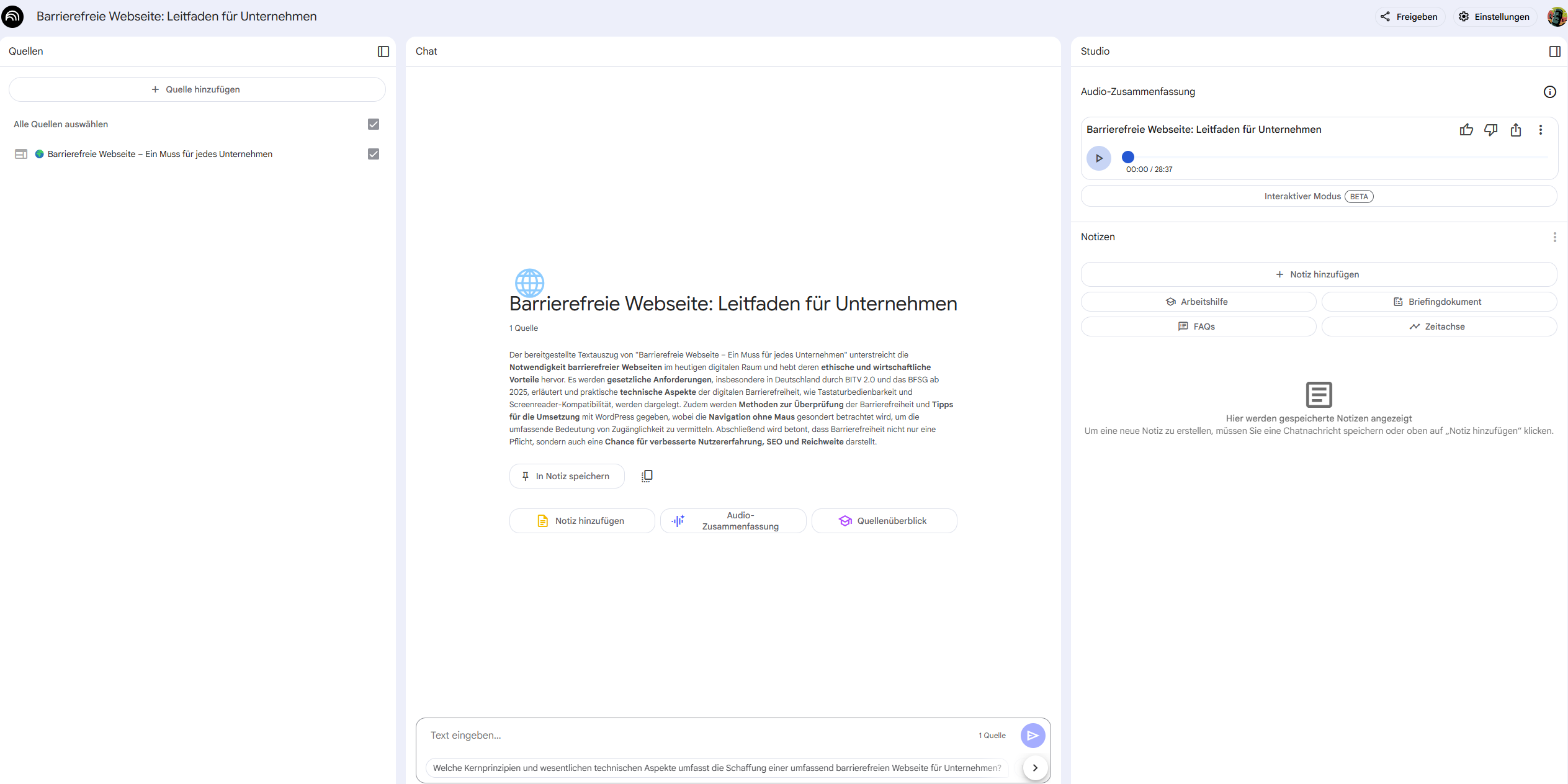
1. Personalized insights and context understanding
NotebookLM uses all uploaded sources to create an individual knowledge model. It provides precise answers to questions and shows the underlying sources, ensuring transparency and traceability.
2. Summaries and new perspectives
Whether scientific papers, textbook chapters or research material: NotebookLM prepares complex content in an understandable way and can also identify new trends and connections.
3. Audio function – knowledge in podcast format
A central feature is the “Audio Overview” function. With one click, an automated audio summary in the style of a podcast discussion can be generated from the uploaded sources. The contents are processed in a question-and-answer format.
The function is suitable for use on the go, for example when sports, driving or cooking. It is currently only available in English.
Example of an Audio Summary
An automated audio file on the topic of local SEO shows how NotebookLM structures content and presents it in question-and-answer format. The summary is based on the contents of the corresponding source page.
4. Data protection and security
Google states that uploaded content is not used for training AI models. The data remains private and is processed exclusively for the respective user.
Applications of NotebookLM
- For students and scientists: structured research, precise summaries and quick source analysis.
- For journalists and authors: efficient collection and processing of background information for well-founded articles.
- For companies and marketers: fast market analysis, trend research and data-based decision-making.
- For creatives and content creators: inspiration through intelligent cross-references between different sources.
Disadvantages of NotebookLM
- Limited language support: The tool is primarily designed in English, other languages are not yet available, especially with the audio feature.
- Dependence on the Google ecosystem: Integration works best with Google products like Docs and Drive.
- Possible inaccuracies: Summaries may occasionally contain inaccurate or misleading information.
- No offline mode: An Internet connection is mandatory.
- Open questions about data sovereignty and privacy still exist for some users.
How much does NotebookLM cost?
Google NotebookLM is currently available for free because the tool is still in the development and testing phase. An official statement by Google on whether this remains the case in the long term or whether paid premium functions will be introduced in the future is not yet available.
Assessments and outlook
Industry experts call Google NotebookLM a remarkable application in the field of generative AI. The Wall Street Journal called it one of the most impressive demonstrations of AI potential.
NotebookLM exemplifies a new phase of digital knowledge management that enables more efficient and structured work with information.