
Which newsletter tool is suitable for the self-employed?
For the self-employed, a newsletter tool should above all easy to use, reliable and Suitable for your own marketing strategy be. If you only want to send a newsletter occasionally, you need different functions than someone who wants to automatically develop prospects into customers.
Known solutions include, for example, Klick-Tipp, Brevo, rapidmail and Mailchimp. For self-employed people who want to work more with marketing automation, segmentation and lead generation, Klick-Tipp is particularly interesting. For an easy or cheap start, Brevo or rapidmail can also be useful.
Therefore, the crucial question is not:
“Which newsletter tool is generally the best?”
but:
“What do I want to achieve with my email marketing?”
What should a newsletter tool for the self-employed be able to do?
In order to get started, the following functions are especially important:
- Create and send newsletters
- Managing contacts
- Provide registration forms
- Support for double opt-in
- Manage unsubscriptions automatically
- Segment contacts
- Evaluating newsletter results
- Enable automated email series
- Connect to WordPress or other systems
- Supporting data protection-friendly processes
Those who use newsletters primarily to inform existing contacts may only need part of these functions.
It is different if email marketing is to be actively used for lead generation.
Then additional functions such as Tagging, Segmentation and Marketing Automation Much more important.
Newsletter tools for the self-employed in comparison
| Tool | Particularly interesting for | Focus |
|---|---|---|
| Klick-Tipp | Self-employed with focus on lead generation and automation | Tagging and Marketing Automation |
| Brevo | Self-employed people who want to start flexibly and relatively easily | Newsletter and Automation |
| rapidmail | Classic newsletter | Simple newsletter creation |
| Mailchimp | Internationally oriented users | Email marketing and large ecosystem |
The functions and tariffs of the providers may change. Therefore, before a decision, it should always be checked which functions are actually included in the currently selected tariff.
Klick-Tipp: Focus on Tagging and Marketing Automation
Klick-Tipp is a German-language platform for e-mail marketing and marketing automation.
In addition to the classic newsletter shipping, the focus is clearly on the Automation of marketing processes and the segmentation of contacts.
Klick-Tipp offers, among other things:
- Newsletter delivery
- Marketing Automation
- Contact management
- Tagging
- Segmentation
- Notification forms
- Landing pages
- automated e-mail routes
- SMS marketing
- Different integrations
The tagging concept is particularly interesting.
Contacts can be identified based on their interests or actions and subsequently addressed differently.
A simple example:
A visitor downloads a guide on SEO on a website.
This contact could subsequently be the day
“Interest: SEO”
obtained.
Another visitor is interested in AI Search and receives:
‘Interest: GEO’
Both are in the same e-mail system, but can subsequently receive different information.
This is particularly interesting for self-employed people who offer several services or topics.
On its website, Klick-Tipp also describes various functions relating to data protection and GDPR, including an order processing contract and mail servers in Germany. Further information is provided by the provider on his side Data protection and GDPR Ready.
Klick-Tipp is therefore particularly suitable for self-employed people who later become a newsletter Automated email marketing system Want to expand.
A possible process could be, for example:
Website visitors → Registration → Recognize interest → Appropriate e-mail series → Further content → Request
If, on the other hand, you only want to send the same newsletter to all contacts a few times a year, you may not need these possibilities.
Brevo: flexible entry with automation
Brevo is also an extensive platform for email marketing.
In addition to newsletters, automated processes can be set up. For example, Brevo enables workflows that are triggered by certain events.
This can be a newsletter subscription, but also:
- Click on a link
- Change of a contact feature
- Website visit
- Specific date
- Change of a lead
Brevo describes the possibilities in detail in his Documentation on Marketing Automation.
For the self-employed, Brevo can be interesting if newsletters and simple to more extensive automations are to be combined in one system.
rapidmail: Focus on classic newsletter marketing
Who primarily Create, send and evaluate newsletters Wishes, can also rapidmail look at it.
The provider places a strong emphasis on classic newsletter shipping.
Functions include, inter alia:
- Drag-and-drop editor
- Newsletter templates
- Contact management
- Notification forms
- Evaluations
- automated mailings
- Integrations with different systems
An overview offers rapidmail on his page to the Newsletter functions.
For self-employed people who do not want to set up complex marketing processes and above all are looking for a clear newsletter solution, rapidmail can therefore be interesting.
Mailchimp: an internationally established platform
Mailchimp Internationally, it is one of the well-known e-mail marketing platforms.
The system offers, among other things:
- Newsletter
- Email templates
- Forms
- Segmentation
- A/B tests
- Marketing Automation
- Numerous integrations
Depending on the tariff, however, the available automation and marketing functions differ. A current overview offers Mailchimp on its Price side.
For self-employed people who work internationally or already use other systems from the Mailchimp ecosystem, the platform can be interesting.
For international providers, it should also be checked which data protection requirements result from the specific use.
Which newsletter tool suits which self-employed person?
The selection can be made more easily if the planned use is first considered.
I mainly want to send newsletters
Those who want to regularly send information to an existing distributor need above all:
- Simple editor
- Contact management
- Templates
- Statistics
- Reliable shipping
Here, for example, rapidmail or Brevo It’s interesting.
I want to start as easily as possible
If you want to try email marketing first, you should pay particular attention to an easy start and manageable costs.
Here can be Brevo It’s interesting.
Before registering, however, the current tariff limits and included functions should be checked.
I want to build automated email routes
If a series of e-mails is to be sent automatically after a newsletter subscription, marketing automation becomes important.
For example:
Day 0: Welcome and provide download
Day 3: Recommend further technical articles
Day 7: Explaining common problems
Day 12: Presenting suitable performance
For such scenarios, in particular Klick-Tipp and Brevo question.
I want to consider different interests of my contacts
If some of the contacts are interested in SEO, another for Google Ads and another for AI Search, they should not necessarily all receive the same emails.
This is where tagging and segmentation become important.
It’s just that Klick-Tipp a strong focus. The provider combines its tag-based contact management with automated campaigns.
I want to develop leads automatically
For the self-employed, email marketing can become particularly interesting if it is connected to their own website.
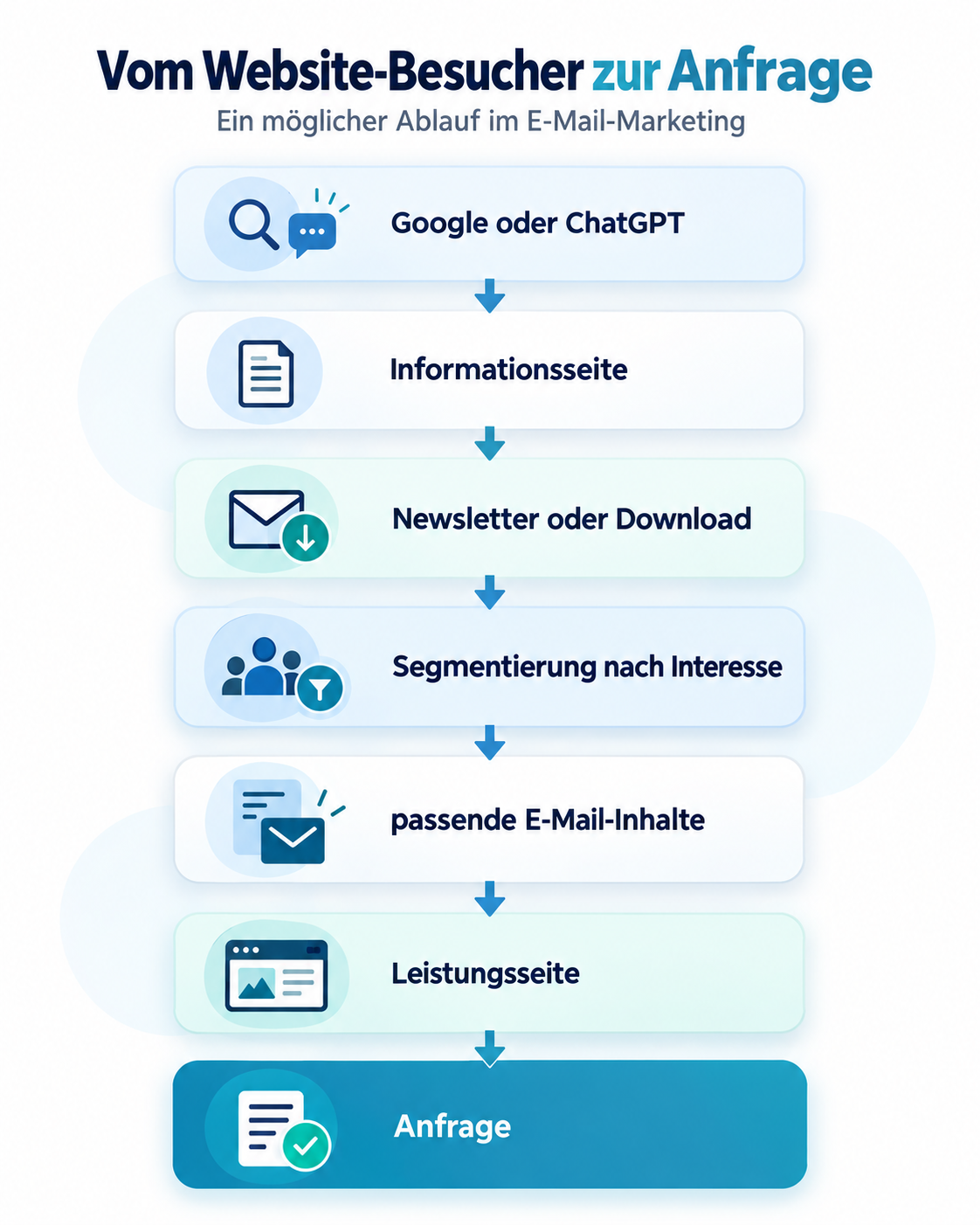
In such a scenario, the newsletter tool should not be considered in isolation. It becomes part of the entire lead generation.
Klick-Tipp positions itself precisely in this area with tagging, marketing automation, landing pages and various integration options.
What should the self-employed additionally pay attention to?
In addition to the functions of the respective tool, there are some points that are often more important in the decision than individual additional functions.
Marketing Automation
Automation can be particularly interesting for the self-employed because time and human resources are limited.
Recurring processes do not have to be carried out manually every time.
For example, once a welcome series has been set up, it can automatically send appropriate information to each new contact.
Both Klick-Tipp and Brevo offer extensive automation functions. For example, Brevo works with triggers, actions and rules that allow contacts to go through different workflows.
Data protection and double opt-in
Anyone who sends newsletters processes personal data.
Therefore, it should be examined:
- How is consent obtained?
- Is double opt-in supported?
- How is consent documented?
- Is there an order processing contract?
- Where is data processed?
- How does deregistration work?
- What information must be included in the data protection declaration?
- Which tracking functions are used?
Importantly,
A newsletter tool alone does not automatically make the entire newsletter process legally compliant.
Klick-Tipp provides, for example, an AVV, uses mail servers in Germany and offers additional data protection functions.
Nevertheless, the concrete implementation of data protection law must fit your own company and purpose.
Interfaces and later expandability
Especially at the start is often only thought of the newsletter.
Further systems may be connected later:
- WordPress
- Website forms
- CRM
- Date booking
- Webinar systems
- Shops
- Payment service providers
- Landing pages
Anyone who can already foresee that email marketing should be more automated later should consider these requirements early on.
A later change of the newsletter system is possible, but causes additional effort.
Conclusion: The newsletter tool should fit the strategy
For the self-employed, there is not the one newsletter tool that is the best choice in every situation.
In simplified terms, the selection can be summarized as follows:
| Requirement | Interesting solution |
|---|---|
| Send newsletters easily | rapidmail |
| Flexible entry | Brevo |
| Tagging and Marketing Automation | Klick-Tipp |
| Develop leads automatically | Klick-Tipp or Brevo |
| International ecosystem | Mailchimp |
Those who mainly want to send newsletters occasionally do not need an extensive marketing automation platform.
Who opposes Winning leads through your own website, wants to segment contacts by interests and then develop them automatically, systems such as Klick-Tipp Take a closer look.
The three most important questions before the selection are therefore:
- Do I just want to send newsletters or automate processes?
- Do I want to distinguish contacts according to interests and behavior?
- Which systems do I want to connect with my newsletter tool in the future?
Those who answer these questions can assess significantly better which newsletter tool actually fits their own business model.
Frequent questions about newsletter tools for the self-employed
Which newsletter tool is suitable for beginners?
For beginners, simple operation, understandable newsletter editors and a clear contact management are important. Brevo and rapidmail can be interesting for a relatively straightforward start.
Is Klick-Tipp suitable for the self-employed?
Yes. Klick-Tipp is aimed, among other things, at self-employed and smaller companies. The system is particularly interesting when newsletters are to be combined with tagging, segmentation and marketing automation.
Can I also send normal newsletters with Klick-Tipp?
Yes. Newsletter shipping is one of the core functions. In addition, Klick-Tipp offers marketing automation, tagging, landing pages and other lead generation functions.
Which is better: Klick-Tipp or Brevo?
This depends on the planned operation. Brevo offers a wide range of newsletter and automation features. Klick-Tipp places a particularly strong emphasis on tagging and automated marketing processes. Decisive are therefore the own requirements and the required tariff.
Do I need marketing automation as a self-employed person?
Not mandatory. With few contacts and occasional newsletters, a simple system may suffice. Automation becomes more interesting when new leads are regularly added, different interests are taken into account or recurring email processes are to be automated.
Should I select the newsletter tool only by price?
No. A favorable entry is attractive, but later requirements should also be considered. A change can be complex if forms, automations, tags and numerous contacts are already available.