
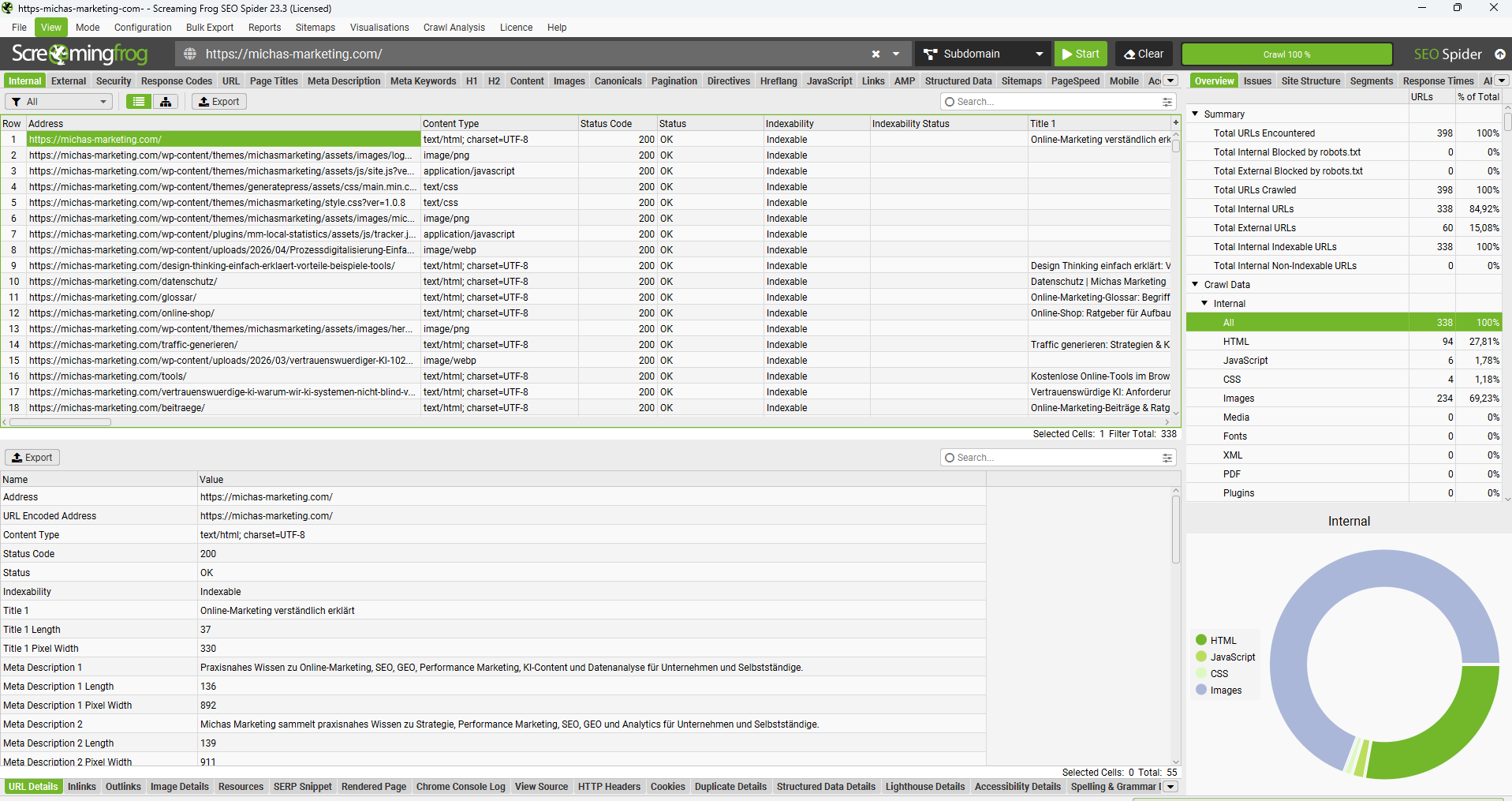
With Screaming Frog, technical SEO problems can be systematically detected on a website.Der SEO Spider folgt internen Links ähnlich wie ein Suchmaschinen-Crawler und sammelt dabei unter anderem Statuscodes, Seitentitel, Meta Descriptions, Überschriften, Canonicals, Bilder und strukturierte Daten. So entsteht aus hunderten oder tausenden URLs eine übersichtliche Arbeitsliste.
I regularly use Screaming Frog for technical SEO audits, relaunch checks and quick quality checks. In this guide I show which evaluations are particularly useful, how you find typical errors and in which order you should edit the results.
What is Screaming Frog?
The Screaming Frog SEO Spider is a website crawler for Windows, macOS and Linux. You enter a start URL, start the crawl and the program follows the found links. Then you can check, filter and export technical and content SEO signals URL by URL.
The free version is suitable for smaller websites and crawls up to 500 URLs per run. The paid license removes this crawl limit and unlocks, among other things, advanced configurations, JavaScript rendering, crawl comparisons, custom extraction and API connections. Since prices and functionality can be changed, you will find the current information directly from the provider.
Screaming Frog at a glance
| Area | What you test with it | Typical measure |
|---|---|---|
| Status codes | 404 errors, 5xx errors, redirects and forwarding chains | Correct links and clean up forwardings |
| Snippets | Page Titles and Meta Descriptions | Revise missing, duplicate or abridged information |
| Content | H1/H2, word count and exact and similar content | Expand pages, merge them or differentiate them more clearly |
| Indexation | noindex, robots.txt, canonicals and sitemaps | Correct unintended indexing signals |
| Internal links | Crawl depth, inlinks, anchor texts and link score | Significant pages of prominent and direct links |
| Technology | JavaScript, Core Web Vitals, Structured Data and Security | Fixing rendering, performance and markup issues |
Getting Started Fast: Crawling the Website Right
- Install the program:Lade den SEO Spider von der offiziellen Website herunter und installiere ihn. Screaming Frog SEO Spider on the official website
- Enter the start URL:Trage die vollständige Adresse deiner Website ein, zum Beispiel
https://www.example.de/. - Starting the crawl:Klicke auf „Start“ und warte bei einer vollständigen Prüfung, bis der Fortschritt 100 Prozent erreicht.
- Filter results:Arbeite dich nicht wahllos durch alle URLs. Nutze die Tabs, Filter und den rechten Bereich „Overview“.
- Crawl Analysis:Starte nach dem Crawl die nachgelagerte Analyse. Erst dann werden unter anderem Link Score, Near Duplicates und bestimmte Orphan-URL-Filter vollständig befüllt.
- Prioritizing Findings:Beginne mit Fehlern auf wichtigen, indexierbaren Seiten und nicht automatisch mit dem zahlenmäßig größten Problem.
Important:Prüfe vor größeren Crawls, ob du die Website crawlen darfst. Reduziere bei kleinen oder empfindlichen Servern die Geschwindigkeit unter den Crawl-Einstellungen. Ein aggressiver Crawl kann unnötige Serverlast verursachen.
Quick Wins: These errors can be found directly in the tabs
Status codes and broken links
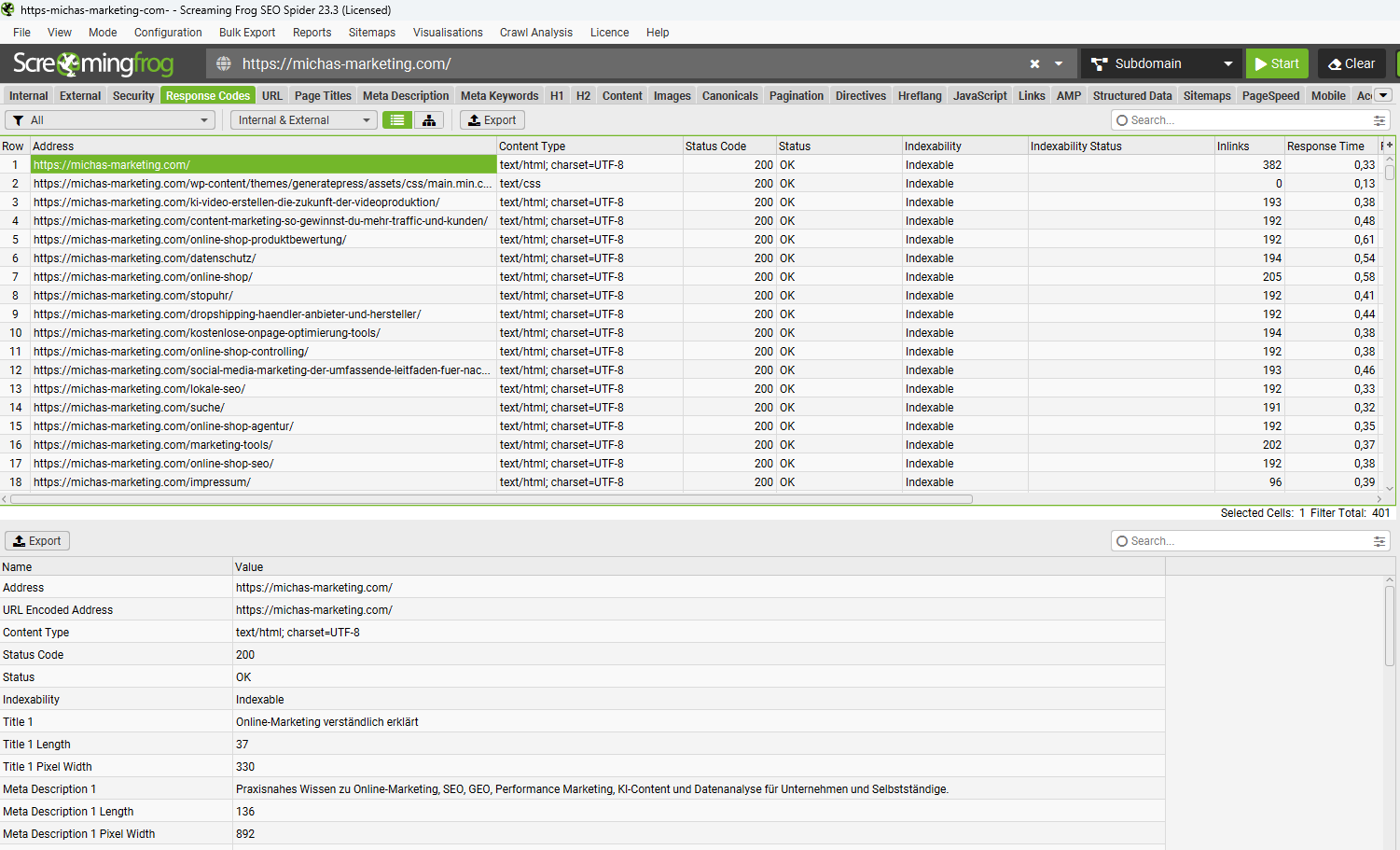
In the “Response Codes” section, you will find URLs with redirects and client and server errors. The main tasks:
- Internal 404 errors:Wähle die betroffene URL aus und öffne unten den Tab „Inlinks“. Dort siehst du, welche Seite auf die defekte Adresse verlinkt. Korrigiere den Link oder richte bei einem dauerhaft verschobenen Inhalt eine passende 301-Weiterleitung ein.
- Redirect chains and loops:Exportiere sie über „Reports“ → „Redirects“ → „Redirect Chains“. Interne Links sollten möglichst direkt auf die endgültige Ziel-URL zeigen.
- Temporary transfers:Prüfe 302- und 307-Redirects. Für dauerhaft verschobene Inhalte ist in der Regel eine permanente Weiterleitung vorgesehen.
- 5xx errors:Übergib wiederkehrende Serverfehler mit URL, Zeitpunkt und Crawl-Einstellungen an die Technik. Einzelne Fehler sollten zur Sicherheit erneut getestet werden.
- External broken links:Prüfe auch externe Ziele. Entferne veraltete Verweise oder ersetze sie durch eine aktuelle, vertrauenswürdige Quelle.
Page Titles
- Identify missing, duplicate or multiple titles in the source code.
- Check too long and too short titles. Screaming Frog evaluates not only the number of characters but also the estimated pixel width; this is more meaningful for the possible presentation in search results.
- Do not automatically treat titles that correspond exactly to H1 as errors. Often, however, the title can be tailored more to search intention and click incentive, while the H1 clearly names the page.
- Check boilerplate and truncated brand names, especially for automatically generated product or category pages.
The known pixel boundaries are useful warning values, but not a guarantee for a specific display. Google can rewrite search result titles and displays different amounts of text depending on the device and search query.
Meta Descriptions
- Find missing and duplicate descriptions, for example in the case of pagination, filter URLs or copied page templates.
- Check very long descriptions. Values above the pixel width stored in the tool can be cut off in the preview.
- Provide important pages with a concrete statement, relevant benefits and a suitable action impulse.
- Do not blindly write descriptions for any insignificant URL. Priority is given to indexable pages with rankings or realistic search potential.
Headings H1 and H2
- Check pages without H1, with several H1 or with duplicated H1.
- Although several H1 are basically possible in HTML, in editorial templates a clear main heading is usually easier to maintain and check.
- Check the H2 structure for comprehensibility. Missing subheadings can indicate poorly structured content.
- Not only process filters: The decisive factor is whether the headings structure the content sensibly and give users orientation.
Pictures
- Under “Images” filter for missing or empty alt attributes. Informative images need a meaningful text alternative; purely decorative images may have an empty alt attribute.
- Identify large image files, for example via “Over 100 KB”. The limit is a good starting point, but not a quality judgement: format, dimensions and visible size must be evaluated.
- Reduce oversized images and check modern formats such as WebP or AVIF.
- Investigate missing width and height data, as reserved space can reduce layout shifts.
- Clean up defective image URLs and images loaded through a redirect.
Check indexability and canonicals
Indexability
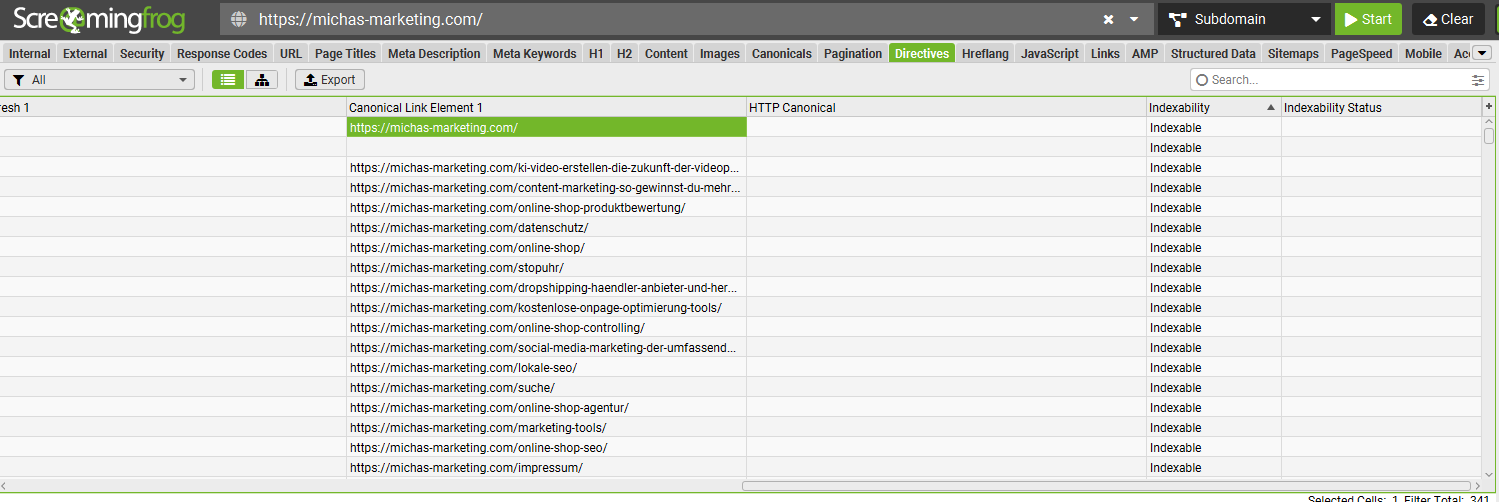
Im Tab „Directives“ und über die Spalten beziehungsweise Filter zur Indexierbarkeit erkennst du, welche URLs aufnoindexstehen, durch die robots.txt blockiert sind oder wegen eines Canonicals als nicht indexierbar gelten.
Besonders häufig finde ich zwei gegensätzliche Probleme: Eine wichtige Landingpage ist versehentlich aufnoindexgesetzt, während unbedeutende Filter- und Parameter-URLs vollständig indexierbar sind. Bewerte deshalb immer,which:URL betroffen ist und welche Aufgabe sie innerhalb der Website hat.
Canonicals
- Check missing canonical tags on indexable HTML pages.
- Find canonicals that point to redirects, 404 pages, noindex URLs or technically inappropriate pages.
- Resolve conflicting canonicals from HTML headers and HTTP headers.
- Avoid canonical chains and refer as directly as possible to the preferred, accessible 200-URL.
- For paginated pages, variants and parameter URLs, check whether the Canonical strategy really fits the desired indexing.
A canonical is an indication to search engines and not a substitute for a clean URL structure. Internal links, sitemap entries, redirects and canonicals should support the same preferred URL if possible.
Improve internal linking and page structure
- Crawl depth:Sortiere die Spalte „Crawl Depth“. Wichtige Seiten sollten mit wenigen Klicks erreichbar sein. Ebene 4 oder tiefer ist ein Prüfsignal, aber nicht pauschal ein Fehler.
- Few inlinks:Identifiziere relevante Seiten mit sehr wenigen internen Links. Ergänze passende kontextuelle Links aus starken, thematisch nahen Seiten.
- Many outlinks:Prüfe Templates oder Linklisten mit ungewöhnlich vielen ausgehenden Links. Nicht jeder Link ist problematisch, doch große, unstrukturierte Listen können Fokus und Nutzbarkeit schwächen.
- Anchor texts:Exportiere die internen Ankertexte, zum Beispiel über „Bulk Export“ → „Links“ → „All Anchor Text“. Ersetze nichtssagende Formulierungen wie „hier klicken“ durch verständliche, kontextbezogene Linktexte.
- Link Score:Nutze den internen Link Score als relatives Signal. Eine geschäftlich wichtige Seite mit sehr niedrigem Wert verdient eine manuelle Prüfung.
Finding Orphan Pages
An orphaned page cannot be reached from the normal starting point of the crawl via internal links. For Screaming Frog to be able to compare such URLs at all, the tool needs additional sources:
- Engage XML Sitemap and/or connect Google Search Console or GA4.
- Enable crawling of newly discovered URLs in the respective configuration.
- Complete the website crawl.
- Then start “Crawl Analysis”.
- Evaluate the Orphan URL filters under Sitemaps, Analytics and Search Console.
Without additional URL source and downstream crawl analysis, the corresponding filters remain empty. Check found pages manually: Relevant content should be linked internally; obsolete or unwanted pages require redirection, removal or clear indexing instructions, depending on the case.
Thin Content and Duplicate Content
- Sort word number:Seiten mit sehr wenig Text sind Kandidaten für eine Prüfung. Eine feste Grenze wie 300 Wörter ist jedoch kein Ranking-Gesetz. Eine kurze Kontakt-, Produkt- oder Rechnerseite kann ihren Zweck vollständig erfüllen.
- Exact duplicates:Gleiche Hash-Werte können auf identische Seitenvarianten hinweisen. Prüfe Weiterleitungen, Canonicals und die interne Verlinkung.
- Near Duplicates:Aktiviere die Speicherung beziehungsweise Analyse des Seiteninhalts vor dem Crawl und führe danach die Crawl Analysis aus. Der standardmäßige Ähnlichkeitsschwellenwert von 90 Prozent lässt sich anpassen.
- Template Shares Consider:Navigation, Footer und wiederkehrende Elemente können den Vergleich beeinflussen. Lege bei Bedarf einen relevanten Content-Bereich für die Analyse fest.
- Check search intention:Ähnliche Seiten müssen nicht automatisch zusammengelegt werden. Entscheidend ist, ob jede Seite einen eigenständigen Nutzen und eine eigene Suchintention bedient.
Control structured data
Enable the extraction and validation of structured data in the crawl configuration. Screaming Frog can collect JSON-LD, Microdata and RDFa and check against Schema.org or supported Google functions.
Pay particular attention to:
- missing mandatory or recommended characteristics,
- invalid values and syntax errors,
- conflicting information between visible content and markup,
- Pages of a particular type where the expected markup is missing,
- Markup that is technically correct but does not match the actual page content.
Passed validation does not guarantee a rich result. Initially, it only shows that the markup meets the tested technical requirements.
API connections: Crawl data becomes priorities
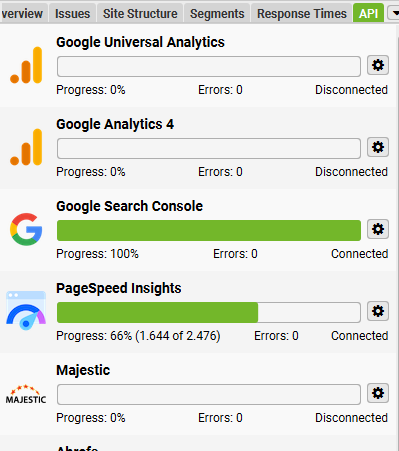
PageSpeed Insights API
Via the PageSpeed Insights connection, lighthouse data, performance diagnoses and – if there is enough real user data – CrUX or core web hospitals data can be retrieved per URL. Especially helpful are hints about unused CSS and JavaScript, image optimization, render blocking and long main thread tasks.
Missing CrUX values do not automatically mean that a page is fast or slow. For URLs with little traffic, the amount of data is often not sufficient for a separate field data set.
Google Search Console and GA4
Once connected, you can combine crawl data with performance and usage data. This turns technical lists into concrete priorities:
- Many impressions, but a low click-through rate: Check title, description, search intention and SERP environment.
- Good rankings on the second result page: improve content, internal linking and snippet.
- Indexable URLs without impressions over a long period of time: check quality, search demand, cannibalization and consolidation.
- Pages with organic traffic that were not found in the normal crawl: investigate possible orphan pages.
- Process technical errors on sales- or conversion-strong pages first.
“No Impressions” alone is not a reason for deletion. Seasonal content, new URLs, service pages and content for existing customers can also make sense without organic traffic.
Advanced Exams with Screaming Frog
JavaScript rendering
Activate JavaScript rendering for websites whose content and links are client-sided. Compare the raw with the rendered HTML. In this way, you can tell whether important texts, links, canonicals or meta data only appear through JavaScript or change after rendering.
Custom extraction
With XPath, CSS selectors or regular expressions, you can read individual values. Examples:
- product prices and availability,
- Author, date of publication and update,
- tracking or consent code,
- open graph and social media tags,
- Item numbers, reviews or special markup fields.
Custom search
Search the source code for placeholders and unwanted remnants, for example “Lorem ipsum”, old phone numbers, test domains, obsolete tracking IDs or certain plugin outputs. Use the search also positively: This allows you to check on which templates an expected code is missing.
Spelling and grammar
Place the language in German and use the exams under “Content”. Proprietary names, technical terms and compound words occasionally generate false alarms; therefore, proposals should be reviewed editorially and not adopted unfiltered.
Hreflang
Bei internationalen Websites findest du unter anderem fehlende Rückverweise, ungültige Sprach- oder Ländercodes, nicht indexierbare Zielseiten und hreflang-Ziele mit einem Statuscode ungleich 200. Kontrolliere zusätzlich, ob alle Varianten aufeinander verweisen und eine passende Standardversion überx-defaultsinnvoll ist.
Sitemap comparison
Vergleiche die XML-Sitemap mit dem normalen Site-Crawl. So findest du URLs in der Sitemap, die weiterleiten, einen Fehler liefern, aufnoindexstehen oder nicht intern verlinkt sind. Umgekehrt erkennst du indexierbare Seiten, die in der Sitemap fehlen.
Security and accessibility
In addition, it is worth taking a look at insecure content, mixed content, insecure forms and missing security headers. The integrated accessibility check can also automatically indicate numerous WCAG-related problems. Such automatic tests are useful, but do not replace manual checking with keyboard and screen reader.
Compare crawls
With Crawl Comparison you can understand which errors have newly added or disappeared. This is especially valuable after a relaunch, a migration, a template update or major content changes. Compare not only the number of errors, but also status codes, indexability, canonicals, titles and internal linking of important URLs.
Prioritize SEO Problems Sensibly
Die Anzahl der gefundenen URLs ist selten die beste Sortierung. 500 unwichtige Filter-URLs ohne individuelle Meta Description können weniger dringend sein als eine zentrale Kategorieseite, die aufnoindexsteht oder nur auf Crawl-Tiefe 5 erreichbar ist.
| Priority | Typical cases | Why first? |
|---|---|---|
| Very high | Important pages with noindex, 5xx, false canonical or accidental robots.txt blockade | The page may not be reliably crawled or indexed |
| High | Internal 404s, redirect chains, orphan pages and weak internal linking of important URLs | User guidance, crawlability and internal signals suffer |
| Resources | Double titles, weak descriptions, large images and thin content with search potential | Optimization can improve visibility, click-through rate and user experience |
| Lower | Formal warnings on unimportant or deliberately unindexable URLs | Low expected effect; often sufficient observation or template cleaning |
I prioritize finding based on four questions:
- Is the URL indexable and should it be found organically?
- How important is it for traffic, leads or sales?
- What is the potential harm or benefit?
- Can the problem be solved once in the template or does each URL have to be edited individually?
Recommended workflow after each crawl
- Complete crawl and re-test conspicuous failures if necessary.
- Run “Crawl Analysis” so that Orphan Pages, Near Duplicates and Link Score are available.
- Export an overall overview via “Reports” → “Crawl Overview”.
- Segment results by page type, such as products, categories, guides and system pages.
- Enrich with search console, analytics and business data.
- Prioritize tasks by impact and effort.
- After implementation, crawl again and verify the change.
- Regular audits save configuration and compare crawls so that the results remain reproducible.
My practical tip:Dokumentiere nicht nur den Fehler, sondern auch Beispiel-URL, Seitentyp, Ursache, empfohlene Lösung, Verantwortlichkeit und Prüfkriterium. Aus einem großen Export wird so ein umsetzbarer SEO-Plan.
Advantages and Limitations
| Benefits | Boundaries |
|---|---|
| Many technical signals in a crawl | The tool does not automatically evaluate the business significance of a page |
| Flexible filters, exports and individual extractions | Warnings are test signals and not always real errors |
| API data can be supplemented exactly to the URL | Large websites require sufficient memory or database storage |
| Suitable for audits, migrations and quality controls | A crawl primarily shows the technically achievable state at the time of testing |
| Small websites can be checked for free | Many advanced features require a paid license |
Conclusion: Screaming Frog turns a website into a verifiable database
Screaming Frog is especially strong if you want to systematically examine not only individual pages, but a complete website. Even the standard tabs provide quick success with broken links, redirects, titles, descriptions, headings and pictures. With crawl analysis, JavaScript rendering and API connections, it becomes a comprehensive tool for technical audits and content decisions.
The biggest benefit is not through as many exports as possible, but through clean prioritization: first important pages with indexing or accessibility problems, then structure, snippets, content and performance. After implementation, a control crawl should confirm that the cause has actually been fixed.
Frequent Questions about Screaming Frog
Is Screaming Frog Free?
Yes. The free version of the SEO Spider crawls up to 500 URLs per run and contains important basic functions. Unlimited crawls and many advanced configurations, integrations and analytics require a paid annual license.
What does the limit of 500 URLs mean?
Not only visible HTML pages are counted. Depending on the configuration, the crawl can also capture images, CSS and JavaScript files, forwarding URLs, parameter URLs and other resources. Therefore, the limit can also be reached with a seemingly small website.
Is Screaming Frog also suitable for beginners?
The first crawl just started, but the amount of data can seem overwhelming at first. Beginners should start with Response Codes, Page Titles, Meta Descriptions, H1, Images and the Overview section. It is important not to treat warnings unchecked as errors.
Can Screaming Frog see which pages are indexed on Google?
The normal crawl shows whether a URL appears indexable from a technical point of view. Whether Google actually indexed them is another question. Via the Search Console integration and optionally the URL inspection API, additional indexing data can be retrieved; the quotas specified by Google apply.
Why doesn’t Screaming Frog find all sides?
Possible causes are missing internal links, robots.txt rules, login areas, non-crawlable JavaScript navigation or an inappropriate configuration. Include XML Sitemap, Search Console or Analytics as additional sources if you also want to find orphaned URLs.
Why do the filters for orphan pages or near duplicates remain empty?
For Orphan Pages, Screaming Frog requires an additional URL source such as Sitemap, Search Console or Analytics. Near duplicates must be activated before the crawl. In both cases, a “crawl analysis” is required after the completed crawl.
Can Screaming Frog Crawl JavaScript Websites?
Yes, in the license version, the SEO Spider can process pages with the integrated Chromium renderer. This is helpful for React, Vue or Angular applications. Compare rendered and original HTML to detect JavaScript dependencies.
How often should I crawl a website?
This depends on size and frequency of change. After relaunches, migrations and major template changes, a crawl is mandatory. For running websites, a monthly or quarterly audit can be useful; very dynamic shops and portals often benefit from shorter intervals.
Does Screaming Frog Change My Website?
A normal crawl reads publicly accessible content and does not change it. However, it generates requests to the server. Crawl speed, rendering, URL number and sensitive functions such as forms should therefore be configured responsibly.